The Punjab Job Portal is the Government of Punjab’s official website for government job advertisements and online applications. This guide explains how to create your account, complete your profile, search for jobs, and apply, step by step.
The portal is at jobs.punjab.gov.pk. It is free to use, and it replaces the old system of buying newspapers and posting paper applications to each department separately. The details below were checked against the portal’s own pages in September 2026.
What the Punjab Job Portal is
The portal is a single window for Punjab government jobs. Instead of every department running its own hiring page, the departments advertise their vacancies in one place. As of September 2026, the portal’s homepage shows 516 registered departments and organisations.
That includes:
- Health departments, hospitals, and medical colleges
- Education institutions and universities
- Agriculture, forestry, and livestock agencies
- Municipal corporations and local government bodies
- Transport and infrastructure departments
- Social welfare organisations
You build one profile and reuse it. You do not retype your education and experience for every post.
What you need before you start
Keep these ready:
- A working email address that you can open, because your account and password reset both depend on it
- Your CNIC
- Your education details: degrees, institutions, years, and marks or grades
- Your experience details, if you have any
- A scanned photograph and scanned certificates, since many advertisements ask you to upload them
How to register and apply, step by step
Step 1: Open the official portal
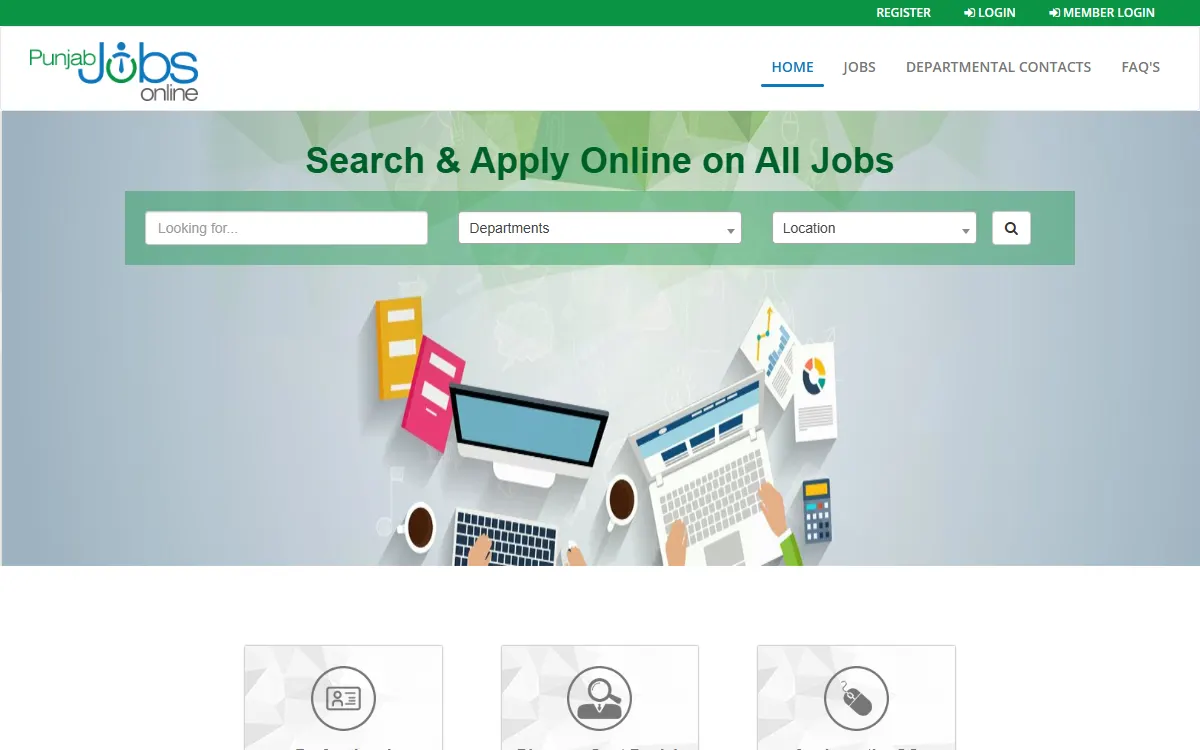
Go to jobs.punjab.gov.pk. Check the address carefully. Many private job websites copy the look of the government portal and charge for information that is free here.
Step 2: Create your account
Click Register at the top of the page. Enter your email address, set a password, and confirm it. The portal then sends an account activation link to your email. Open that link before you try to log in. If it does not arrive, check your spam or junk folder.
Step 3: Complete your profile
Log in (the login form also asks you to type a captcha code) and open the Profile Builder. Fill in every tab:
- Personal details: name, CNIC, date of birth, district, and contact number
- Education: each degree with the institution, year, and result
- Experience: employer, role, and dates
- Skills and any additional qualifications
Complete this properly once. A half-filled profile makes your application look weak, and some departments filter candidates on these fields. The portal’s FAQ also asks you to keep your profile true and accurate at all times. Your profile photo can be up to 4 MB.
Step 4: Search for jobs
Open the jobs section and use the filters:
- By profession or job title, if you know the post you want
- By department, if you want a specific organisation
- By location, if you need to work near home
Once you are registered, you can also set up Target Jobs: choose a job title, career level and salary range, and the portal emails you alerts when matching jobs appear. You can save a job you want to apply for later.
Step 5: Read the advertisement before applying
This is the step most people rush. Before you apply, check:
- The minimum qualification and whether your degree matches
- The age limit, and whether any age relaxation applies to you
- The closing date
- Whether a test or interview is part of the process
- Whether a fee challan must be paid separately
If you do not meet the stated criteria, your application will normally be rejected at the screening stage.
Step 6: Apply and keep checking
Click Apply on the job page. A small window asks for your current and expected salary and any disability information, then you submit. A green message on screen confirms it, and the portal also sends you an email and a text message.
Check everything before you submit. The portal lets you apply for each job only once, and a submitted application cannot be edited.
What happens after you apply
According to the portal’s FAQ:
- Hiring usually starts after the closing date of the advertisement
- If you are shortlisted, you should be contacted within one month of that closing date
- You get email and text message updates at each stage: shortlisting, interview, selection, or rejection if your details cannot be verified
- The Applied Jobs page in your account lists every job you applied for, with the date
So keep your phone number and email working, and keep logging in. Individual departments may also share test dates and roll number slips through the portal or by email.
If the portal says your profile does not match
Sometimes you click Apply and see a message that your profile does not match the job’s requirement. The portal’s FAQ says this means one of two things: either you are not eligible for that job, or your profile is incomplete or out of date.
First, read the advertisement again and compare the qualification and age limit with your documents. If you do meet them, go back to the Profile Builder, fill in any empty tabs, especially education, and try again. Only apply for jobs that genuinely match your profile.
Common mistakes to avoid
- Using an email you cannot open. Password resets and interview calls go to that address.
- Applying after the closing date. Late applications are not accepted.
- Leaving the profile incomplete. Missing education fields can get you screened out.
- Paying an agent. Registration and application on the portal are free. Nobody can sell you a government job.
- Trusting copycat websites. Only jobs.punjab.gov.pk is the official portal.
Punjab Job Portal support
If the portal itself is not working, or you cannot log in, you can contact portal support:
- Email: jobsonlinesupport@punjab.gov.pk
- Phone: +92 42 35880062, extension 1222
For questions about a specific advertisement, such as eligibility or the test date, contact the department that posted it. The portal has a Departmental Contacts page, linked from its homepage, with an email or phone number for many departments. Portal support handles the website, not individual hiring decisions.
Punjab Job Portal and PPSC are not the same
Many Punjab government posts, especially higher-grade and civil service posts, are recruited by the Punjab Public Service Commission (PPSC) through its own separate website, not through the Job Portal. If the advertisement says PPSC, you must apply on the PPSC portal instead. Our PPSC online apply guide explains that process.
If you applied through PPSC, our PPSC test schedule guide and PPSC written result guide show where your test date, admission letter and result are posted.
Internships and other programs
The portal is also used for some paid government internships. For example, the Livestock Department’s 2026-27 internship for veterinary graduates and para-vets took applications on jobs.punjab.gov.pk until 15 May 2026 (APP report). An internship is fixed-term work experience, not a permanent job.
If you are currently out of work, a few other programs may help, but each works differently:
- Paid internships: our CM Punjab Internship Program guide explains which CM internships are running and what they pay.
- Digital skills: the e-Rozgaar Program teaches freelancing and digital skills. As of September 2026 it charges a course fee, and its official pages do not mention any stipend.
- Free skills courses: Hunarmand Pakistan runs free NAVTTC training. As of September 2026, its main intakes are closed.
- Jobs abroad: the Parwaaz Card gives interest-free loans to Punjab residents who already have an overseas job offer.
To see which welfare programs your household may qualify for, try our free eligibility checker.
GoPunjab is an independent information website. We cannot register you, submit your application, forward your CV, or influence any hiring decision. We only explain how the official process works so you can complete it correctly yourself.