MTMIS Punjab vehicle verification is the free, official way to check the registration record of a vehicle registered in Punjab. As of September 2026, the official portal is mtmis.excise.punjab.gov.pk, and it asks for the registration number and the registration date together. This guide explains what MTMIS is, how to use it, how to check and pay token tax, and how to avoid fake websites.
A quick warning first. Many websites, and an earlier version of this guide, gave the address mtmis.punjab.gov.pk. When we checked on 14 September 2026, that address did not open at all. The Excise department’s own website, excise.punjab.gov.pk, links to the correct portal under “Online Verification of Registered Vehicles”.
What is MTMIS Punjab vehicle verification
MTMIS stands for the Motor Transport Management Information System. It is the vehicle registration system of the Punjab Excise, Taxation and Narcotics Control Department, built by the Punjab Information Technology Board (PITB). It holds the registration and tax record of vehicles registered in Punjab.
The public part of MTMIS is a simple verification page. You enter a vehicle’s details and it shows the official registration record. This helps a buyer confirm that a vehicle and its papers are genuine before any money changes hands. The page footer names the Excise department and PITB, which is one quick way to tell it apart from copycat sites.
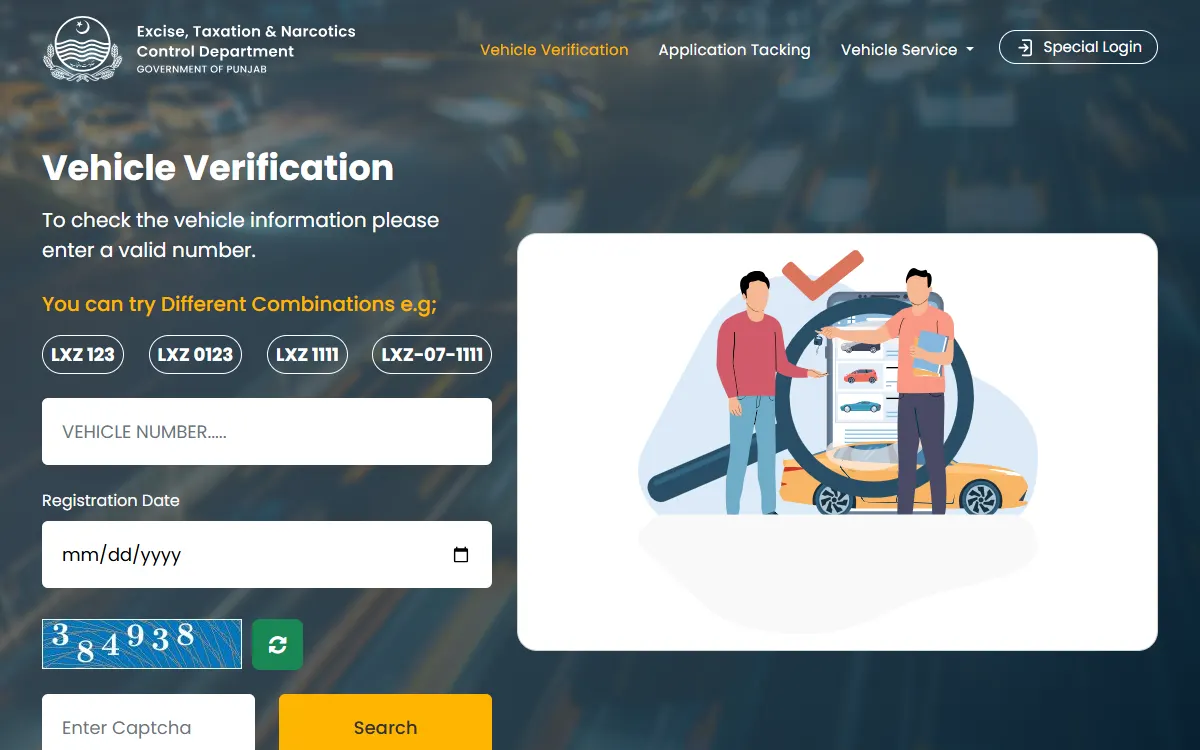
How to verify a vehicle, step by step
- Open mtmis.excise.punjab.gov.pk, or click “Online Verification of Registered Vehicles” on the Excise website.
- Enter the vehicle registration number. The page shows example formats such as LXZ 123, LXZ 0123 and LXZ-07-1111.
- Pick the registration date from the calendar. This is the date the vehicle was registered, as shown in its registration papers.
- Type the picture code (captcha) and press Search.
- Compare the result with the seller’s papers and with the numbers on the vehicle itself.
On 25 September 2026, the page would not search without both the number and the registration date. This is a privacy step. It means you can check a vehicle whose papers you have seen, with the seller’s knowledge, but you cannot look up a stranger’s car from its number plate alone. The form has changed before, so follow the fields the page shows.
Only check a vehicle you own or are seriously planning to buy. The record can include the owner’s personal details, so do not share screenshots of it, and never use it to contact or trace an owner.
In the past, the record has shown details such as the make and model, the engine and chassis numbers, the registration date, the owner’s name and the token tax status.
Other tools on the MTMIS portal
The same portal has a few more options in its menu:
- Application Tracking: follow a registration or transfer application using its application number and the chassis number.
- Vanity Vehicle Verification: check a vehicle that has a vanity (personalised) number plate.
- Number Plate Information: see number plate details using the registration number and the chassis number.
- e-Registration Card: the Excise website says owners who are still waiting for a physical registration card can download an e-Registration Card. Open it only from the link on excise.punjab.gov.pk.
Is there an SMS service?
In October 2017, PITB and the Excise department launched a vehicle verification SMS service on 8785. We could not confirm in September 2026 whether it still works, or whether it now needs extra details too. Use the website first.
How to check token tax
Token tax is the yearly motor vehicle tax. The Excise department sends people to ePay Punjab to check and pay it. ePay Punjab is the government’s official payment system, built by PITB under the Finance Department. You can use the website epay.punjab.gov.pk or the ePay Punjab app from Google Play or the App Store.
- Open ePay Punjab and choose Token Tax under Excise and Taxation.
- Enter the vehicle’s details and see the amount due.
- Generate a 17-digit PSID (payment slip ID).
- Pay the PSID through mobile banking, internet banking, an ATM, a bank counter, a mobile wallet or a telco agent.
- Keep the payment receipt.
The screens can change, so follow the app’s own steps. Token tax payment is also listed as a service on Maryam Ki Dastak.
Rates depend on the vehicle type and engine size. The Excise website publishes the 2026-27 rates on its Motor Vehicle Tax page. The department also offered a 10% rebate on token tax paid by 31 August 2026. That window has closed, so check the Excise website for any new offer before you pay.
For the full steps, the 2026-27 rates and the lifetime token for bikes and small cars, see our token tax check online Punjab guide.
Why verify before buying a used car
Verifying helps you avoid a stolen, tampered or tax-defaulted vehicle. Before you pay:
- Confirm that the registration record matches the seller’s CNIC and papers.
- Match the engine and chassis numbers on the vehicle with the record.
- Check the token tax status so you know about any unpaid dues.
- For a stolen-vehicle check, Punjab Police offer vehicle verification at Police Khidmat Markaz.
When ownership is transferred, the Excise department asks for biometric verification. From late January 2026, it said biometric verification for registration and transfer could be done through NADRA’s Pak Identity app. Its 2026 token tax notice also tells buyers to get the vehicle into their own name promptly and not to forget biometric verification when buying from anyone.
If anything does not match, do not pay. Ask the Excise department for advice first.
Our vehicle transfer Punjab guide explains the transfer fee, documents and Pak ID biometric steps.
Stay safe from fraud
- Use only mtmis.excise.punjab.gov.pk, opened from the Excise website. Many private sites use “MTMIS” in their name and end in .com, .org or .pk without “.gov.pk”. They are not the Excise department.
- Verification is free. Never pay a website or agent to “unlock” vehicle details.
- Pay token tax only through ePay Punjab or official Excise channels, and never share your OTP or bank PIN.
- Never share a vehicle owner’s details online.
- Report fraud through the Pakistan Citizen’s Portal.
Contact the Excise department
For general questions, the Excise, Taxation and Narcotics Control Department lists the helpline 0800-08786 on its contact page. You can also visit your nearest Excise office or use the services on excise.punjab.gov.pk.
Related guides
Vehicle and driving services go together. See our guide on driving license online Punjab, book Excise services at home through Maryam Ki Dastak, and for identity documents read the NADRA CNIC online guide. You can also try our free eligibility checker.
GoPunjab is an independent information website. We are not the Excise, Taxation and Narcotics Control Department or PITB, and we cannot verify, tax or transfer a vehicle for you. We only explain how the official process works.