An e challan check online Punjab drivers can trust has one official home: the PSCA E-Challan System at echallan.psca.gop.pk, run by the Punjab Safe Cities Authority. People search for it in many ways, such as “echallan check”, “e challan check by number plate” or “traffic challan check by CNIC”, but they all mean the same thing: is there a camera challan against my car or bike, and how much is it? Checking is free, and you do not need to register or log in.
E challan check online Punjab in 3 steps
- Open the official portal, echallan.psca.gop.pk. The search box on the home page is titled Search E-Challan.
- Type your Plate Number in the first box, then the CNIC of the registered owner (13 digits, no dashes) or the Chassis Number in the second box.
- Enter the captcha that appears and press Search. The portal then shows the challans recorded against that vehicle.
Both boxes are marked with a star on the portal, so a plate number alone is not enough. That is deliberate: it keeps strangers from looking up another person’s vehicle with a plate they saw on the road.
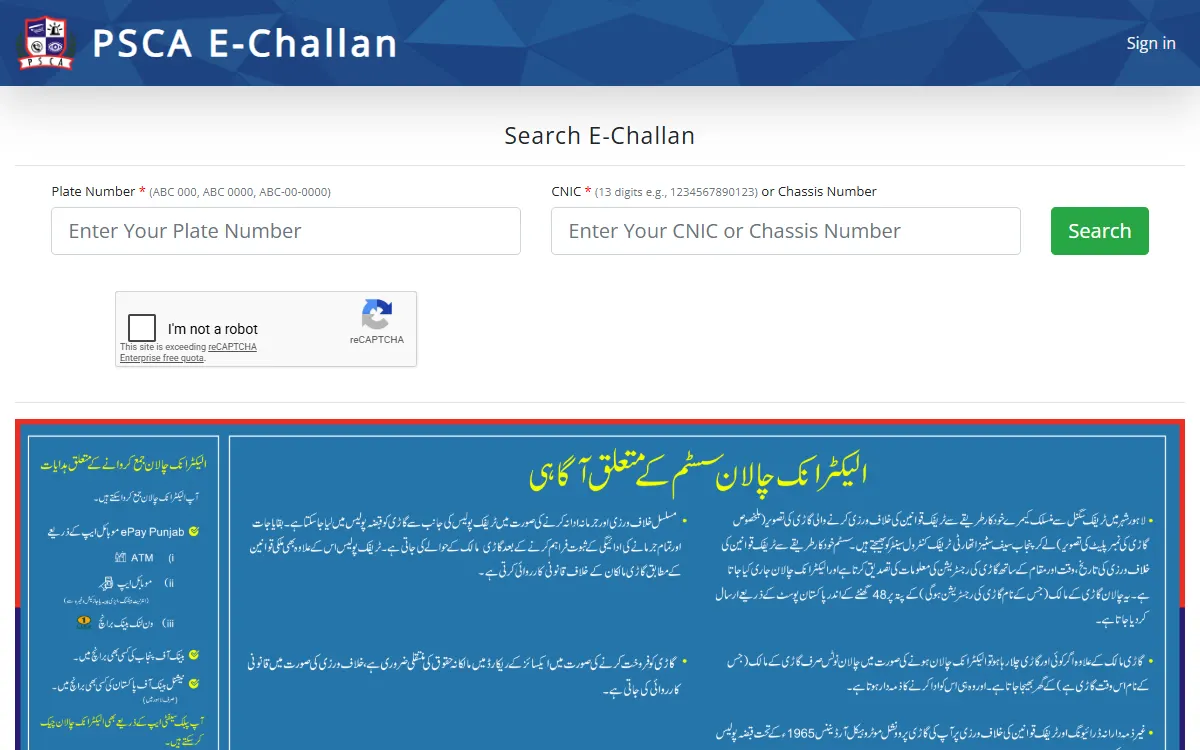
What the portal asks for, box by box
| Box | What to enter | Where to find it |
|---|---|---|
| Plate Number | Your registration number in one of the printed formats: ABC 000, ABC 0000 or ABC-00-0000 | The number plate and your registration book |
| CNIC | The 13 digit CNIC of the registered owner, with no dashes | The owner’s identity card |
| Chassis Number | Use this instead of the CNIC if the vehicle is not registered in your own name yet | The registration book, and stamped on the vehicle body |
| Captcha | The characters shown on screen | On the page itself |
The Sign in button at the top of the portal is not part of this public search, so ignore it.
What your result means
If the vehicle has camera challans, the portal lists them with the details PSCA has recorded. If nothing is found, either there is no e-challan against that vehicle, or one of the three things you typed does not match the record. Before you relax, check these in order:
- Spacing in the plate. Old and new series are written differently. Try ABC-00-0000 as well as ABC 0000.
- The CNIC you used. It must be the CNIC of the person the vehicle is registered to, not the driver. If the vehicle was bought recently and the transfer is not complete, use the chassis number instead.
- The chassis number. Copy it from the registration book, not from memory.
If you are not sure who the vehicle is registered to, check the ownership first with our MTMIS Punjab vehicle verification guide. It explains how to check the vehicle’s registration record on the Excise Department’s own portal.
Challans this portal does not show
The PSCA system holds electronic challans issued from the Safe City camera network. A paper slip handed to you at the roadside by a traffic warden belongs to the traffic police record, and may not appear in this search.
If your slip has a challan number printed on it, keep it. That number is what you need at the bank counter or in the ePay app, whether or not the challan shows online.
How to pay an e challan in Punjab
The Punjab government announced online e-challan payment on 1 January 2021, through the ePay Punjab app. Its official announcement on the Punjab Portal says citizens can pay:
- through the mobile banking of 23 banks
- through the internet banking of 18 banks
- at the ATMs of 21 banks
- over the counter at 28 banks
- through wallets and services including Easypaisa, JazzCash, HBL Konnect, UBL Omni and TCS
ePay Punjab is at epay.punjab.gov.pk, and the same app pays other government dues such as token tax. Our token tax guide shows how to check and pay it with a PSID. Bank lists change, so open the “where to pay” section of ePay Punjab for the current one.
PSCA also publishes a free mobile app called PSCA Public Safety on Google Play and the App Store.
Why you should check even if no slip arrived
A camera challan is recorded against the vehicle, and the notice is posted to the address in the registration record. If you moved house, bought the vehicle recently, or the transfer was never completed, the slip can reach somebody else while the challan stays against your vehicle. Unpaid challans can hold up work at the Excise office later, so a two minute search before you sell, transfer or renew is worth it.
The same applies if you lend your bike or car. The challan follows the vehicle, not the driver.
Keep your own record straight
Two related checks are worth doing at the same time:
- Vehicle record: check the registration record with our MTMIS vehicle verification guide, and any tax due with our token tax guide.
- Driving licence: if your licence is expired or you are still waiting for the card, our driving licence guide for Punjab explains the Dastak and DLIMS steps.
Beware of fake challan messages and agents
Checking your challan is free on the official portal, and no agent can cancel a challan for money. Watch for these:
- SMS or WhatsApp links that say your challan is overdue and ask you to pay through a link. Type echallan.psca.gop.pk yourself instead of tapping a link.
- Anyone asking for your OTP or bank PIN. No government office ever needs them.
- Websites that ask for a fee to “check” or “clear” a challan.
If someone demands money to fix a challan, report it through the Pakistan Citizen’s Portal, or at your nearest Police Khidmat Markaz.
GoPunjab is an independent website. We do not issue, check or cancel challans, and we cannot see anyone’s vehicle record. Always finish on the official portal.