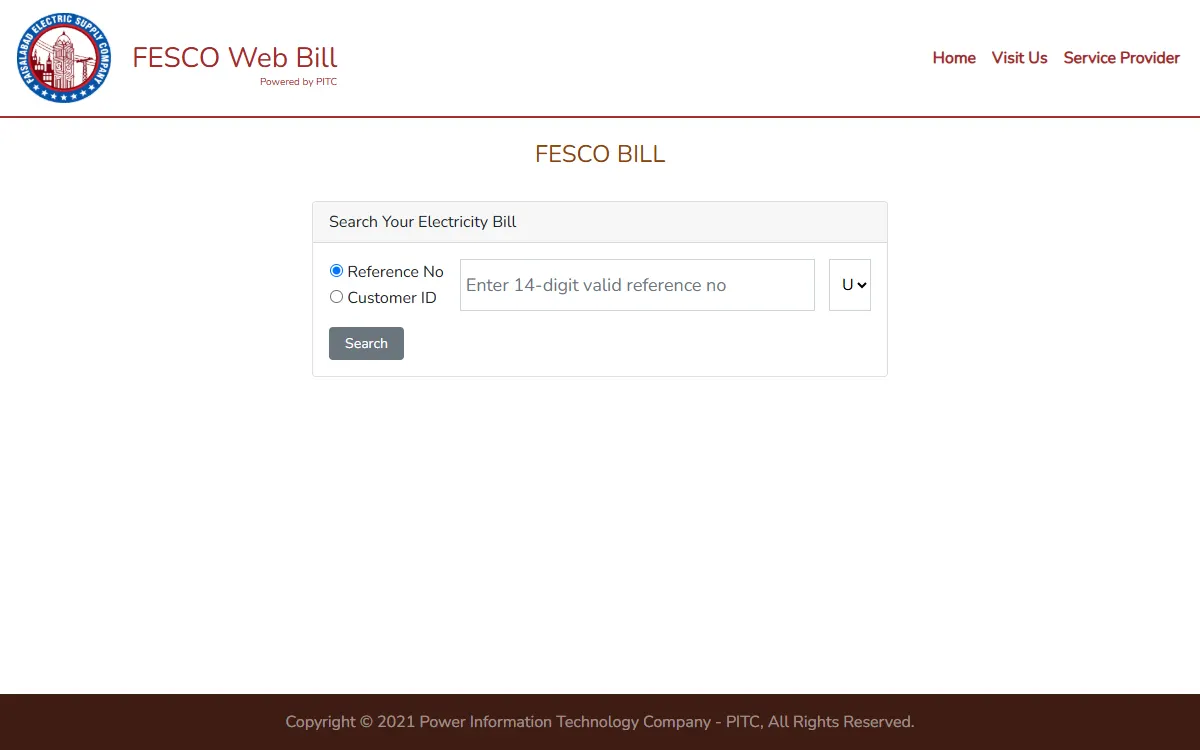
A FESCO bill check online takes less than a minute on the official web bill page, bill.pitc.com.pk/fescobill. It is run by the Power Information Technology Company (PITC), which runs the official web bill portal for 11 power distribution companies. The Bill Print and Duplicate Bills links on FESCO’s own website open this same page. You only need the reference number from an old bill. Checking is free, and you do not need to register or log in.
FESCO stands for Faisalabad Electric Supply Company. Its website says its service area covers the Faisalabad, Sargodha, Mianwali, Khushab, Jhang, Bhakkar, Toba Tek Singh and Chiniot districts. If your bill comes from another company, this guide does not apply to you. See our guides for LESCO, MEPCO, GEPCO and IESCO instead.
FESCO bill check online in 3 steps
- Open the official page, bill.pitc.com.pk/fescobill. Its heading reads FESCO Web Bill, Powered by PITC.
- Keep Reference No selected and type your 14 digit reference number with no spaces. In the small box next to it, choose U or R to match your bill.
- Press Search. Your latest bill opens, and you can print it or save it as a PDF.
That is all. The page does not ask for your CNIC, phone number or any payment.
FESCO’s official online services
As of October 2026, FESCO’s website sends you to the PITC web bill page rather than running its own bill viewer. These are the official online services it links to.
| Service | Where to find it | What it is for |
|---|---|---|
| FESCO Web Bill | bill.pitc.com.pk/fescobill, or Bill Print on fesco.com.pk | View and print your bill with the reference number or Customer ID |
| CCMS complaint portal | ccms.pitc.com.pk | Register a complaint and track it |
| SMS service registration | SMS Registration link on fesco.com.pk | A free FESCO service that sends supply and billing information to your mobile |
| CNIC and mobile registration | CNIC/Mobile Registration link on fesco.com.pk | Link the occupant’s CNIC and mobile number to a connection |
You do not need the last three to see your bill. The PITC home page lists all 11 distribution companies, so make sure you pick FESCO.
Your reference number explained
The reference number is the key to your bill, and it is printed on every FESCO bill. The search box asks for a 14 digit reference number; its hint reads “Enter 14-digit valid reference no”. Type digits only, with no spaces.
Next to the box is a small drop down with U or R. The page selects U by default, so change it only if your bill shows R.
You can also search by Customer ID by choosing that option above the box.
Lost every old bill? Ask a family member for a photo of a recent bill, or visit your FESCO subdivision office for help. The same number is also used for some government schemes, for example the CM Punjab Solar Scheme asked for it.
How to download or print a duplicate bill
When your bill opens on the PITC page, use your browser’s print option. On a phone, tap the menu, then Print or Share, then Save as PDF. PITC says the page gives you a duplicate bill “for payment at any branch”.
If you cannot print at home:
- Save the bill as a PDF and print it at any shop.
- Or visit your FESCO office. The NEPRA Consumer Service Manual, which FESCO publishes on its Customer Services page, says the SDO, the Revenue Officer and the in-charge of a Customer Services Centre can issue a duplicate bill on the same day.
FESCO’s head office is on West Canal Road, Abdullah Pur, Faisalabad.
How to pay your FESCO bill
FESCO’s FAQ page says it has arrangements with all scheduled banks of Pakistan, NADRA, UBL Omni, Easypaisa, Bank Alfalah online and the post offices. It says you can deposit your bill at any authorised bank branch or post office within your district or city.
The NEPRA Consumer Service Manual (November 2025), which FESCO publishes on its website, adds that bills can also be paid:
- at NADRA kiosks
- online, or by ATM card or credit card, where this is available
The official CCMS portal warns: never send bill money to any person’s own Easypaisa, JazzCash or bank account.
Keep the paid bill or the transaction message. If an amount you already paid shows up again on your next bill, the manual says the Revenue Officer, or the manager of the bank or post office where you paid, can correct it the same day when you show the original paid bill.
Due date and late payment surcharge
Your bill shows a due date. FESCO’s FAQ says 7 days are allowed for paying electricity bills. Under the NEPRA Consumer Service Manual:
- The due date is within 15 days of the bill being issued, and you should get at least 7 clear days after the bill reaches you.
- If the due date falls on a holiday, it moves to the next working day.
- If you pay after the due date, a late payment surcharge is added. The bill shows the amount payable after the due date.
- If the due date is extended for you, no late payment surcharge is charged.
- If your bill arrives late and you do not get 7 clear days, a FESCO officer can extend the due date without a surcharge.
The manual also allows instalments for the current month’s bill, with markup at 14% a year on the instalments after the first. Rules can change, so read the payment instructions printed on your bill.
FESCO complaints and helpline
FESCO lists these channels for customers:
- Call 118. FESCO’s FAQ gives the toll free complaint number as 041-118.
- CCMS web portal at ccms.pitc.com.pk, where you can register a complaint and track it. FESCO’s website links to it.
- The CCMS portal also lists SMS 8118 and email ccms@pitc.com.pk.
For a wrong bill, FESCO’s FAQ says to report it to your concerned Sub-Division or Revenue Office. If a CCMS complaint is not resolved properly, the portal says you can escalate it in writing to its Head of Quality and Assurance at qaccms@pitc.com.pk.
For other helpline numbers in the province, see our Punjab helpline numbers guide. If a complaint is ignored, you can also escalate it through the Pakistan Citizen’s Portal.
Beware of fake bill apps and websites
Checking a FESCO bill is free. Watch for these:
- Unofficial bill websites and apps that copy the FESCO name. They are not run by FESCO. The official bill page is bill.pitc.com.pk/fescobill, and FESCO’s own website is fesco.com.pk.
- SMS or WhatsApp messages saying your connection will be cut today unless you pay through a link. Check your bill yourself on the official page instead.
- Anyone asking you to send money to a personal account for a bill, a meter or a bill correction. The CCMS portal says to report such calls or messages to the 118 helpline.
- Anyone asking for your OTP, bank PIN or card number. FESCO never needs them to show you a bill.
- Agents who offer to “reduce” a bill for a fee. Bill corrections are made only through FESCO itself.
Paying other government dues too? See our guides to token tax in Punjab and property tax in Punjab.
GoPunjab is an independent website. We are not FESCO or PITC, we cannot see anyone’s bill, and we do not collect payments. Always check and pay through the official channels.