PPSC online apply is the process for competing for Punjab government posts recruited by the Punjab Public Service Commission. This guide explains the official steps, how to pay the fee with a PSID, who pays no fee, and the mistakes that get applications rejected.
The only official website is ppsc.gop.pk. The Commission itself states that its official website is the sole authoritative source for all advertisements, schedules, notices and results.
What PPSC is, and how it differs from the Job Portal
The Punjab Public Service Commission recruits candidates for Punjab government posts through competitive tests and interviews. Its role is to select on merit rather than leaving hiring to individual departments.
This matters because Punjab has two different routes for government jobs, and applying in the wrong place wastes your time:
| PPSC | Punjab Job Portal | |
|---|---|---|
| Website | ppsc.gop.pk | jobs.punjab.gov.pk |
| Typically covers | Higher-grade and civil service posts | Departmental and project posts |
| Selection | Written test plus interview | Set by the hiring department |
| Fee | Rs 600 per post as of September 2026, paid with a PSID | Usually free on the portal |
Always check which body issued the advertisement, then apply on that body’s own website. Our Punjab Job Portal guide covers the other route.
Before you apply: read the advertisement properly
PPSC advertisements are numbered, for example Advertisement No. 10/2026, and each contains several posts, each with its own case number. Before applying, check:
- The post and its grade
- The minimum qualification, and whether your degree is recognised for it
- The age limit, and any age relaxation you may be entitled to
- The domicile requirement
- Any experience requirement, and how it must be evidenced
- The fee, which the Jobs page lists next to each post
- The closing date
If you do not meet the stated criteria, your application will normally be rejected at scrutiny, and PPSC does not refund the fee in any case.
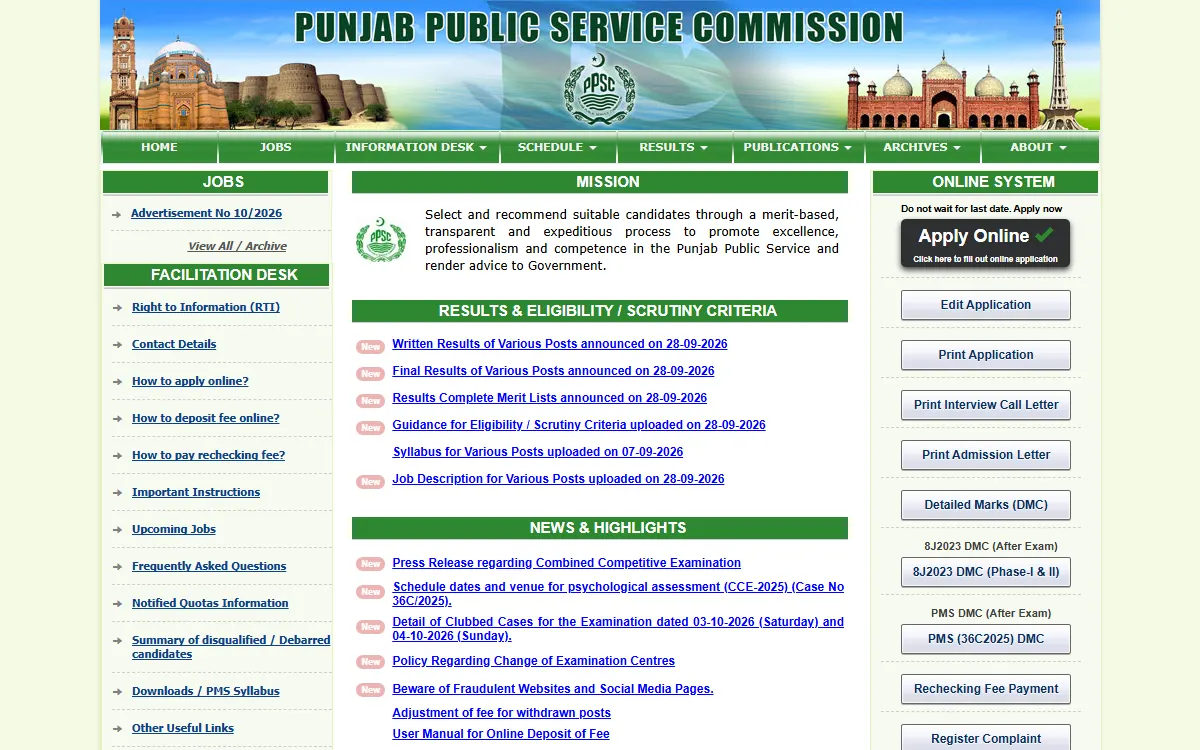
For a recent example, our PPSC Advertisement 10/2026 round-up lists every case in that advertisement.
PPSC online apply: the full process, step by step
These steps follow PPSC’s own “How to apply online” guide, as of September 2026. The online form has six parts: personal profile, fee payment, pictures, qualifications, service record and final submission.
Step 1: Open the official website and choose your post
Go to ppsc.gop.pk and click Apply Online. Select your post, read its details and click Proceed. Read the Important Instructions and the E-Pay User Manual, tick the undertaking box and continue. Private job websites with similar names cannot submit your application.
Step 2: Fill your personal profile
Enter your CNIC number. Then enter your email address and mobile number, and verify both on the next page. Use your own, working email and number, because PPSC does not let you change them later.
Next, enter your date of birth, gender, employment type, disability status and the rest of your personal information, and save it.
Enter everything exactly as it appears on your documents. If your name is spelled differently on your CNIC and your degree, resolve that first, because mismatches get candidates rejected.
Step 3: Pay the fee with your PSID
The system now gives you a PSID (Payment System Identifier), a 17-digit number. You also get it by email and SMS. Pay the fee against this PSID under the GoPb biller, using any of these:
- An ATM of a 1Link member bank: choose Bill Payment, then GoPb, and enter your PSID
- Internet banking or your bank’s mobile app
- JazzCash, Easypaisa, UPaisa or another microfinance bank
- Over the counter at a 1Link member bank branch, with a printout of your PSID
The amount appears automatically when you enter the PSID. PPSC’s E-Pay manual says not to pay any extra charges. If your app shows no PPSC option, PPSC’s FAQ says to pay under the Government Payments (Punjab) section, and to check the details on screen before you confirm.
PPSC no longer accepts the old paper challan (Form 32-A), bank drafts, pay orders or cheques.
Step 4: Upload your pictures
Upload your latest photograph and a picture of the front of your CNIC. Each picture must be smaller than 25KB, so resize it first. The Jobs page links to PPSC’s photograph and CNIC picture requirements.
Step 5: Add your qualifications and service record
Add your qualification details and save them. If you have a service record, add it too.
Step 6: Submit and save your numbers
When every part is complete, the Submit Application button becomes active. Read the undertaking, tick the box and submit before the closing date. You get an Application Number, and PPSC sends a Token Number by email and SMS. Keep both. You need the Token Number to edit or print your application, and you can correct your details until the closing date.
Paying the fee is not the same as applying. PPSC’s FAQ says your application is submitted only after you finish the steps that come after payment. If your session ends, open the Jobs page, select the same post and enter the same CNIC, and the system continues from where you stopped.
PPSC fee in 2026: how much, and who pays nothing
As of 17 September 2026, the PPSC Jobs page lists a fee of Rs 600 for every post in Advertisements No. 09/2026 and 10/2026. PPSC’s instructions set Rs 600 for posts with a one-paper test and Rs 1,000 for competitive examinations. Always check the fee shown next to your post.
- Specially abled candidates and PPSC employees do not pay the fee. Specially abled candidates mark “Yes” in the disability column and need a certificate from the Provincial Council for the Rehabilitation of Specially Abled Persons (Social Welfare Department), issued on or before the closing date.
- Each post needs its own PSID and its own fee. A fee paid for one post cannot be used for another.
- Fees are not refunded, so check your CNIC, the post and your eligibility before you pay.
- If a department withdraws a post, PPSC’s FAQ says the system adjusts your fee in your next online application within one year.
Documents to prepare in advance
Keep these ready, and scan them clearly:
- CNIC
- Domicile certificate
- Educational degrees and result cards
- Experience certificates, if required
- A recent photograph and a picture of your CNIC front, each under 25KB
- A disability certificate, if you apply as a specially abled candidate
For posts in BS-18 or below, you do not send paper copies when you apply, but you bring your documents to the interview. For BS-19 and above, PPSC asks for a hard copy of the online form and two sets of photocopies of your documents by the closing date. You do not need the fee receipt on test or interview day, but keep a printout for your own record.
If you do not yet have a domicile, see our Punjab domicile online guide.
After you apply
PPSC publishes these on ppsc.gop.pk:
- Test and interview schedules
- Admission letters (roll number slips): when your test is scheduled, print yours by entering your CNIC and choosing your post
- Written test results
- Interview calls
- Final recommendations
Do not wait for a letter in the post. If you lose your Token Number, click Edit Application on the home page and choose Forgot / Not Received Token No.
To see where test and interview dates and admission letters appear, read our PPSC test schedule guide. When results come out, our PPSC written result guide shows how to find your name.
How the selection process works
Knowing the stages helps you prepare rather than simply wait.
- Scrutiny. Your application is checked against the advertisement. PPSC’s common grounds for rejection include a fee not paid by the closing date, being under or over age, the wrong domicile, and missing proof of qualification or experience.
- Written test. Many posts have one. Study the syllabus PPSC publishes for your post.
- Shortlisting. Candidates are shortlisted on academic record or test marks. PPSC usually calls five candidates for interview for each post.
- Interview. Bring your original documents. Missing an original degree or domicile can knock you out at this last stage.
- Final recommendation. Successful candidates are recommended to the department.
If PPSC rejects your application, you can send a representation to the Commission within 7 working days, with documentary proof. There is no fee for this.
Common mistakes to avoid
- Applying on a private website instead of ppsc.gop.pk
- Paying the fee but never finishing the application
- Using the old challan form, a bank draft or a cheque instead of your PSID
- Using one PSID for two posts. Each post needs its own PSID and fee
- Details that do not match your documents
- Applying for a post you are not qualified for, which forfeits the fee
- Missing the closing date, as late applications are not accepted
- Using an email or mobile number that is not yours, since you cannot change them later
- Paying an agent or buying “leaked papers”. No one can arrange a PPSC selection. Selection is by test and interview, and anyone claiming otherwise is defrauding you.
- Sharing your banking PIN or an OTP with anyone who offers to pay the fee or apply for you
If someone demands money to arrange a government job, report it through the Pakistan Citizen’s Portal.
Contact PPSC
- Website: ppsc.gop.pk
- UAN: 042-111-988-722
- Email: ppsc@punjab.gov.pk
- Fee payment problems: if you paid but the application does not move forward, PPSC’s FAQ says to contact your bank or payment app so the payment status is updated. You can also complain in PPSC’s Complaint Management System, under the category for online payments.
If you are not selected
Competition for PPSC posts is intense and most candidates are not selected on their first attempt. Other routes worth knowing:
- The Punjab Job Portal for departmental and project posts
- CM Punjab internships for graduates gaining experience: the general program has had no new round since 2024, but other CM internships run in 2026
- Hunarmand Pakistan for free technical skills training
- The e-Rozgaar Programme for freelancing skills
To see which Punjab and federal programmes your household may qualify for, try our free eligibility checker.
GoPunjab is an independent information website. We are not PPSC, cannot submit your application, influence a result, or issue a roll number slip. We only explain how the official process works.