The PPSC written result 2026 for every post is published in one place: the Results section of ppsc.gop.pk, the official website of the Punjab Public Service Commission. Each result is a PDF list of the candidates cleared for interview. This guide shows you where to find it, how to search it, and what to do after you see your name, or do not.
Check the PPSC written result 2026 in 3 steps
- Open ppsc.gop.pk, go to the Results menu and click Written Results (direct link).
- Type your case number or the post name in the Search box. The case number is on your admission letter and in the advertisement.
- Click the case number to open the PDF. Press Ctrl+F on a computer, or Find in page on a phone, and search for your roll number.
Latest update (checked on ppsc.gop.pk on 8 October 2026)
- 06-10-2026: Final Results of various posts announced, plus Results Complete Merit Lists. The new entry on both pages is case 3A2026, Audit Officer (BS-17), Punjab Revenue Authority.
- 05-10-2026: Written Result of various posts announced: Child Psychologist (BS-17), cases 8B2026 and 4B2026, Child Protection and Welfare Bureau.
- 28-09-2026: Guidance for Eligibility / Scrutiny Criteria uploaded, for case 9H2026 (Information Officer).
Source: the “Results & Eligibility / Scrutiny Criteria” box on the PPSC home page. New results appear there first.
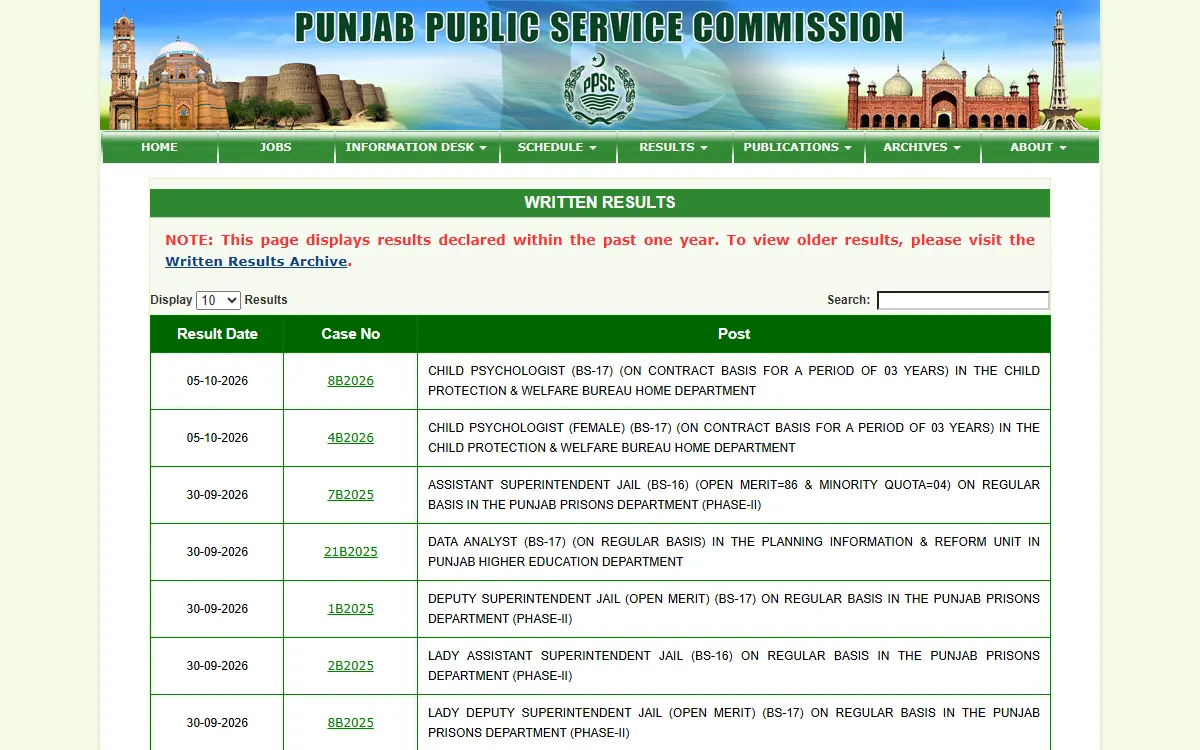
Where PPSC publishes results
Everything sits under the Results menu on ppsc.gop.pk. These are the official page names, as of October 2026:
| Page | What it contains | Link |
|---|---|---|
| Written Results | Candidates cleared for interview after a written test, past one year | WrittenResults.aspx |
| Final Recommendations | Candidates recommended for appointment, past one year | FinalResults.aspx |
| Final Recommendations - Complete Merit List | Every final stage candidate with a status | FinalResultMeritList.aspx |
| Detailed Marks Of Candidates | DMC download for candidates who did not qualify | DMCPage.aspx |
Results older than one year move to the Written Results Archive, the Final Recommendations Archive and the Final Recommendations Complete Merit Lists Archive. You find all three under Archives in the same menu.
How to read the written result PDF
Each written result PDF starts with a notice. It says how many candidates were “provisionally cleared for interview”, for how many posts, and the date of the written test. Below that is a table with:
- Sr. No.
- Roll No. (some lists also show a Diary No.)
- Name of the candidate
- Father’s name
Some lists are split into sections, such as Open Merit, Minority Quota, or posts reserved for male and female candidates. Check every section.
Two points in the notice matter a lot:
- The list is in ascending order of roll numbers, not in order of marks. Being at the top does not mean you came first.
- An entry in the written result does not confer any right to final selection. It is an interview call, not a job offer.
Your roll number is printed on your admission letter. If you no longer have it, print it again from the Print Admission Letter button on the home page, if it is still available for your post.
If your post is not listed yet, PPSC’s FAQ says there is no fixed time. MCQ papers usually take about 10 days and subjective papers about 30 days. Check the PPSC test schedule to confirm your test has been held.
Your name is in the list: what happens next
The recent notices (dated 30-09-2026 and 05-10-2026) say the same three things:
- Interview call letters are uploaded on the PPSC website. Candidates are also told by SMS and email. Print yours with the Print Interview Call Letter button on the home page.
- You are interviewed only if you are found eligible at the time of interview, under the advertisement and the service rules.
- You must bring your original academic certificates and documents to the interview.
To see which documents your post needs, open Eligibility / Scrutiny Criteria in the main menu (GuidanceForEligibilityCriteria.aspx). Each case has a PDF. For example, the guideline for case 9H2026, uploaded on 28-09-2026, lists the qualification, the age limit and the original documents, starting with a valid CNIC and your certificates and transcripts showing obtained and total marks.
The Interviews page shows the tentative month, dates and city for each post. Keep checking it, because dates can change.
Your name is not in the list
- Check carefully first. Look in every section of the PDF and at every page.
- Download your DMC. Open Detailed Marks Of Candidates, choose your type (for a one paper test, Single Paper DMC), then enter your CNIC, your 4 digit Token Number and your post. PPSC issues a DMC to unsuccessful candidates only, and it stays online for 30 days. If you lost your Token Number, use Edit Application on the home page and choose Forgot / Not Received Token No.
- Rechecking. Recent result notices allow rechecking or recounting within 7 days of the result, for a Rs 200 fee. Pay through the Rechecking Fee Payment button on the home page with your CNIC, Application Number and Token Number. Then send an application to the Secretary PPSC with the receipt, your name, roll number, application number and a CNIC copy, by hand or by post to the Information Desk. Fees can change, so follow the notice for your case.
- Answer keys are not published. PPSC’s FAQ says it uploads DMCs instead.
Final Recommendations vs the written result
The written result is stage one. After interviews, PPSC publishes two documents for the same case:
- Final Recommendations: a notice saying the listed candidates “have been recommended to the Provincial Government for appointment”. It shows merit number, application number, name, father’s name and domicile, grouped by quota.
- Complete Merit List: the full picture. For case 3A2026 (06-10-2026), it shows 56 recommended candidates and gives every candidate a status: Recommended, Not Recommended or Fail, with the quota.
Being recommended is not an appointment letter. PPSC’s FAQ says appointment, training and posting are the job of the department. The merit list stays valid for one year, and a substitute is taken from it only if the department asks.
If PPSC rejects you, its FAQ allows a representation to the Commission within 7 working days, with documentary proof and no fee. For other problems, use the Register Complaint button on the home page.
Beware of fake results and agents
PPSC’s home page warns about fraudulent websites and social media pages. It also says its own website is the sole authoritative source for results. Result screenshots on WhatsApp or job blogs can be old, edited or for a different case.
- Never pay anyone who promises to “add your name” or “fix” a result.
- Never share your Token Number, CNIC or OTP with an agent.
- Report job fraud through the Pakistan Citizen’s Portal.
New to PPSC? Read our PPSC online apply guide, browse current posts on our Punjab government jobs page, or try the Punjab Job Portal for departmental posts.
GoPunjab is an independent information website. We are not PPSC, cannot check, change or speed up any result, and do not hold any candidate data. Always confirm your result on ppsc.gop.pk.