Rehmat Card check online is how you find out where your application stands after you have applied. This guide explains how to check your status by CNIC, what each result means, and what to do when it is not what you hoped.
The official portal is rahmatcard.punjab.gov.pk. Checking is free.
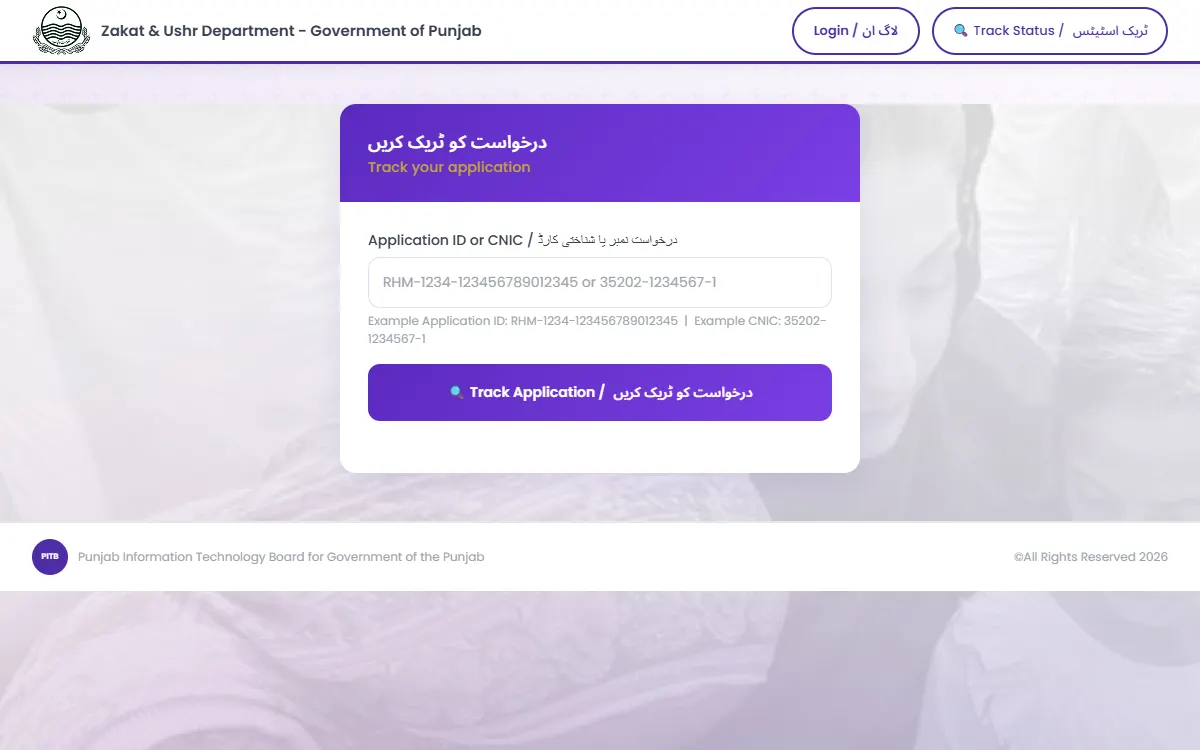
Rehmat Card check online, step by step
Step 1: Open the official portal
Go to rahmatcard.punjab.gov.pk and open the application status section.
Be careful here. Copycat sites appear around every Punjab scheme, collect CNIC numbers, and show adverts. Only the punjab.gov.pk address is official.
Step 2: Enter your CNIC
Enter the 13-digit CNIC you applied with:
- No dashes, no spaces
- The applicant’s CNIC, not a relative’s
That second point catches people out. If your son applied on your behalf using your CNIC, check with your CNIC. If he used his own, nothing will show against yours.
Step 3: Read the result
What each status means
| Status | What it means |
|---|---|
| Submitted | Your application is recorded and waiting to be processed |
| Under verification | Being checked against PSER and NADRA records |
| Approved | You have been selected. Wait for the payment instruction |
| Rejected | You did not meet the criteria at this stage |
| Not found | No application exists against that CNIC |
Submitted and under verification are normal. They are not problems. Applications are processed in phases with a limited number of families per phase, so patience is genuinely required.
If it says “not found”
Work through these in order:
- Check the digits. One wrong number returns nothing.
- Remove the dashes. Enter
3520212345671, not35202-1234567-1. - Confirm which CNIC applied. Use that one.
- Confirm the application was actually submitted, not just started and abandoned.
- Give it time. A very recent application may not appear immediately.
If it still shows nothing, call 1077 with your CNIC to hand.
If you were rejected
A rejection is a decision about your record, not a judgment about your need. The common causes, in rough order of frequency:
1. NADRA does not show widow status. This is the biggest one. If your husband died but your NADRA record still lists you as married, the system cannot verify you as a widow. Fix this with NADRA first, using the death certificate. See our NADRA CNIC guide and death certificate guide.
2. Your PMT score is above the cut-off. Selection uses the Proxy Means Test drawn from survey data. If your household was surveyed while your husband was alive and earning, the score may still reflect that. The route is a re-survey, not an appeal. See our PMT score guide.
3. You are in an excluded category. Government servants, pensioners, Sahib-e-Nisab, and habitual beggars are excluded by the Zakat criteria.
4. You already receive regular provincial assistance. The programme is designed not to duplicate other Punjab schemes.
5. Your PSER record is missing or out of date. See our PSER registration guide.
If you were approved
- Payment is biometric, through Bank of Punjab or JazzCash
- You must attend in person with your CNIC and your own fingerprints
- Nobody can collect it for you, and anyone offering to is attempting fraud
- Follow the instruction you receive rather than a message forwarded by someone else
How long it takes
There is no single published timeline, and that uncertainty causes most of the anxiety around this programme.
What is known: applications are verified against PSER and NADRA, scored on the PMT, and processed in phases with a limited number of families per phase. The first phase targets 50,000 families.
So a status that has not moved for weeks is not necessarily a problem. It usually means your application sits in the queue for a later phase.
Call 1077 if your status has not changed for a long period, or if it moved to rejected and you want the specific reason. Ask for the reason rather than simply asking to be approved, because the reason is what tells you which record to fix.
What to fix while you wait
Whatever your current status, these are worth sorting out now:
- NADRA widow status, which blocks everything else
- Your PSER record, so the household data reflects your situation today
- A SIM registered on your own CNIC, since payment notifications and OTPs depend on it
- B-Forms for children, if orphan support applies to your family
Doing these does not guarantee approval, but leaving them undone almost guarantees the opposite.
Checking is free
- The status check costs nothing.
- No agent can change a rejection into an approval.
- Never share an OTP, including with someone claiming to be from the Zakat office or a bank.
- Nobody can “speed up” verification for a fee.
Report demands for money through the Pakistan Citizen’s Portal or on 1077.
While you wait
A rejection here does not close off other support. Check:
- Benazir Kafaalat, the federal quarterly stipend
- Benazir Taleemi Wazaif for children in school
- Sehat Card for hospital treatment
- Punjab Women Helpline 1043 for free legal advice on inheritance and guardianship
- The full Rehmat Card guide for eligibility detail
To see which Punjab and federal programmes your household may qualify for, try our free eligibility checker.
GoPunjab is an independent information website. We cannot check your status, change a decision, or release a payment. Only the Zakat and Ushr Department can.