An e-bike scheme status check shows you where your application for Phase 2 of the CM Punjab Electric Bike Scheme stands, and later whether you have been given an e-bike (people also search for it as “ebike status check”, “scooty scheme result” or “bike scheme result by CNIC”). As of 19 September 2026, the result is not out, and there is no public tracking or result page for Phase 2. The only official place to see your application is your own account on bikes.punjab.gov.pk.
E-bike scheme status check in 3 steps
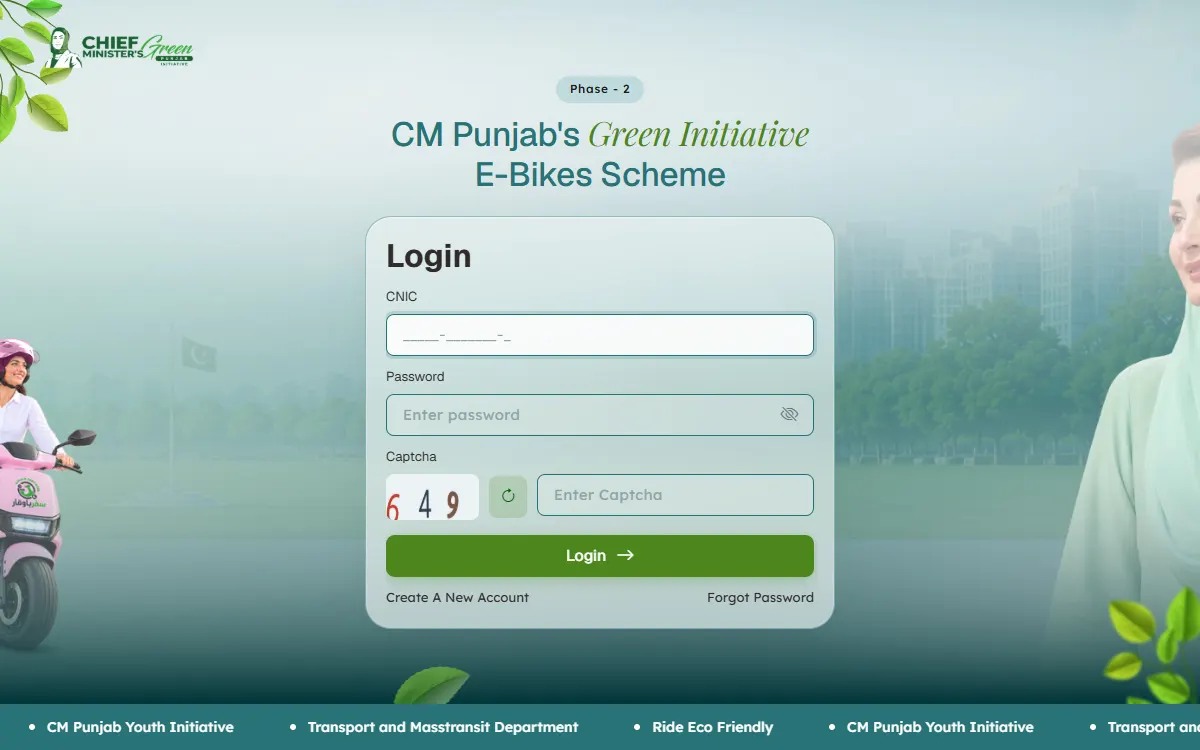
- Open the official login page, bikes.punjab.gov.pk/login, or tap Login at the top of the portal’s home page.
- Enter the CNIC you registered with, your password and the captcha numbers, then tap Login.
- Look at your application in your account. Make sure the form is submitted, and read any stage or message shown there.
There is no public “track application” box where you type only your CNIC, and websites that offer one are not the government. The Institute Login button in the top menu is, going by its name, for educational institutions. Students use Login.
The five stages of your application
The portal’s home page lists five stages. As of September 2026, your application moves through them in this order:
| Stage | What the portal says | What it means for you |
|---|---|---|
| 1. Submit Application | ”Apply online through the official web portal.” | Your form is filled and sent. An account alone is not an application. |
| 2. Documentation | ”Complete documentation and proceed accordingly.” | Your documents and your guarantor’s documents are added. |
| 3. Verification | ”Applicant details and eligibility are verified.” | Officials check that you meet the rules. |
| 4. Approval & Financing | ”Complete the required approval and financing formalities.” | You and your guarantor finish the finance steps. The portal shows the Bank of Punjab as a partner. |
| 5. Bike Delivery | ”Receive your bike and get ready to ride.” | You collect your e-bike. |
The portal has not published the exact status messages you will see inside your account. Go by the wording in your own account, not by screenshots on social media.
Is the Phase 2 result out?
No. As of 19 September 2026, no result, ballot or merit list has been announced for Phase 2. This is what is officially known:
- Last date: the portal shows 4 October 2026. Dates can change, so check the portal.
- Demand: a government press release said 432,000 students registered in the first two days, for 100,000 e-bikes. Not everyone will get one in this phase.
- Selection method: not announced. The overview on the Punjab government’s scheme page, which still describes Phase 1, says an e-ballot by domicile district is held when applications exceed the quota. Its Phase 2 section does not mention a ballot.
- Timing: the Chief Minister directed officials to give eligible students their bikes within six weeks of the portal opening. No result date has been announced.
Some news reports and many websites say Phase 2 applications are handled “first come, first served”. We could not find this on the portal or in a government release, so do not rely on it.
How Phase 1 results were announced (2024)
Phase 1 used the same portal address. Phase 2 may work differently, but this is how results came out last time:
- The e-ballot was held on 11 May 2024 at the Chief Minister’s Office. The Transport Minister ran it by pressing a button, in four categories: e-bikes and petrol bikes, for male and female students.
- The results were posted as PDF lists on the portal’s Balloting Results page, with a list of successful applicants and a waiting list for each category. The lists showed each student’s name, CNIC, district of domicile and institution.
- The successful list was titled a list “for scrutiny by BOP”, the Bank of Punjab. Being on it was not the last step, because the bank still checked each case.
- The Directorate of Public Instruction (Colleges) told students to download their list and search for their name.
- Later, the number of bikes was raised from 20,000 to 27,200, and news reports said students on the waiting list would get bikes later.
That 2024 Balloting Results page is still on the portal. It shows only the Phase 1 lists and a Phase 1 helpline, so your Phase 2 name will not be there.
Common problems and what to do
”I registered, but did I apply?”
Creating an account is only the first step. After you log in, you still fill and submit the application form and add your documents. If your form is not finished, complete it before the last date. Our CM Punjab bike scheme registration guide lists every document.
My CNIC or password is not accepted
- Type the same CNIC you registered with. The box shows the dashes for you.
- Forgot your password? Tap Forgot Password on the login page. It asks for the email address you registered with.
- If the captcha keeps failing, see our e-bike scheme captcha problem guide.
- Not sure you ever made an account? Try Forgot Password with your email first. If you never registered and the portal is still open, register before the last date.
My application seems stuck
Verification takes time, especially with hundreds of thousands of applicants. Check now and then, not every hour. In Phase 1, the government said each student’s own institution verified that they were a regular student. If nothing changes for a long time, email the support address below with your full name and the CNIC you applied with. Never send your password.
I was not selected
Wait for the official announcement, because nothing has been announced yet. In Phase 1, there was a waiting list and more bikes were added later, but that is no promise for Phase 2. Keep your account details safe and watch the portal for news.
I was selected: what next?
Going by the portal’s stages, you would then finish documentation, verification, and approval and financing with your guarantor, and then receive your bike. Keep these ready: your licence or permit, your student card or institution letter, your latest paid fee slip, and your guarantor’s CNIC, recent bank statement, proof of income and a mobile number registered in the guarantor’s name.
Checking is free: stay safe
- Check only on bikes.punjab.gov.pk. Copycat websites that offer a “result by CNIC” cannot see your application.
- Checking is free. Nobody can get you selected, add your name to a list or move you up for money.
- Never share your OTP or password, not even with a shop that offers to “check your status”.
- Ignore calls or messages saying you have “won” a bike and must pay a fee first. The portal says there is no down payment.
- Report anyone who asks for money on the Pakistan Citizen’s Portal.
Contact
- Portal: bikes.punjab.gov.pk
- Email: support@bikes.punjab.gov.pk. This is the support contact shown on the portal.
- Phone: as of 19 September 2026, the Phase 2 pages of the portal do not show a helpline number. The old 2024 Balloting Results page shows 042-111-333-267, but that was the Phase 1 line, so it may not handle Phase 2 questions.
Related support
- CM Punjab Electric Bike Scheme, our main guide to the scheme
- CM Punjab bike scheme registration, the sign-up and document guide
- E-bike scheme captcha problem, if the portal will not accept your code
- Driving licence online in Punjab, for your learner’s permit
To see what else may fit you, try our free eligibility checker.
GoPunjab is an independent information website. We are not the Transport and Mass Transit Department, PITB or the Bank of Punjab. We cannot check your status, see your application or select you for a bike. We only explain how to check it yourself on the official portal.