You can get e stamp paper online Punjab style from home through one official website: the e-Stamping Citizen Portal at es.punjab-zameen.gov.pk. It is a Board of Revenue Punjab system, built by the Punjab Information Technology Board (PITB). Since 10 March 2026 you can pay online and print the e-stamp yourself on plain white paper, so you no longer need a bank visit for most stamps.
E stamp paper online Punjab in 3 steps
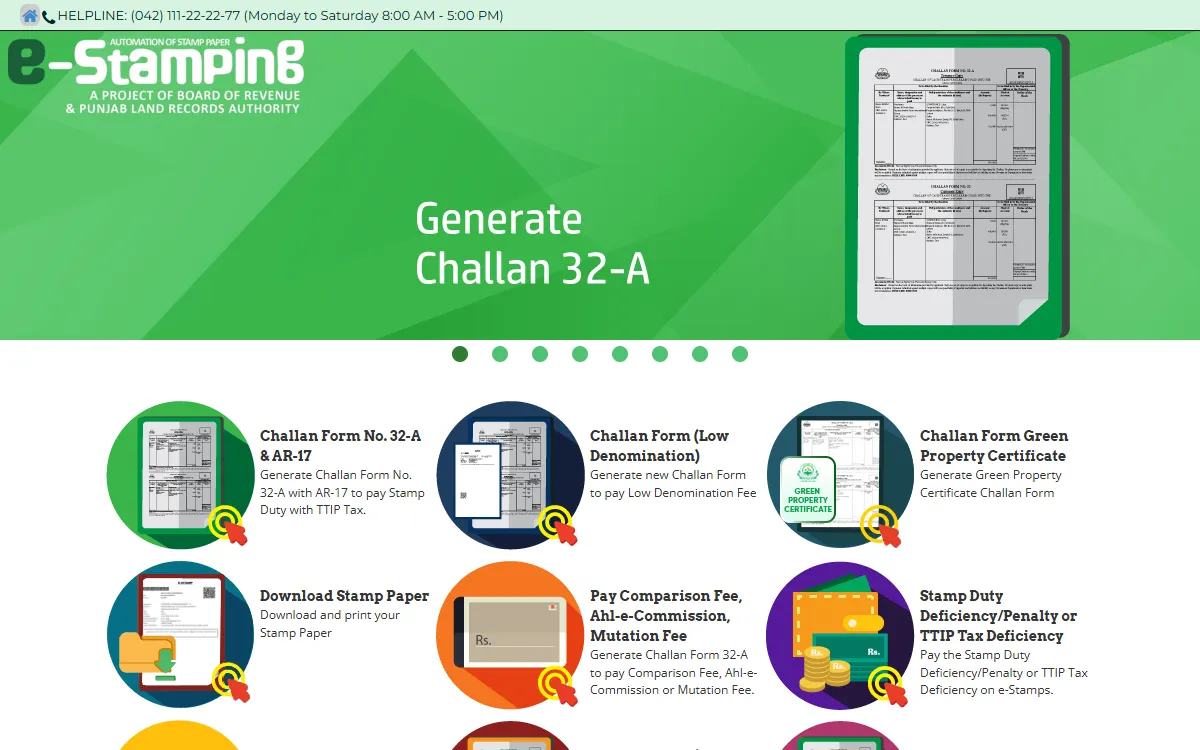
- Make the challan. Open es.punjab-zameen.gov.pk, accept the declaration, and choose the right form: Challan Form (Low Denomination) for small stamps such as an affidavit, or Challan Form No. 32-A & AR-17 for property deeds and other high value stamps. Enter the district, tehsil, names, CNICs and your mobile number, then save. You get a challan number and a PSID.
- Pay the PSID. Pay the amount shown against your PSID online.
- Download and print. Open Download Stamp Paper, enter your challan number or PSID, type the OTP sent to your phone, and print the stamp on plain white A4 paper.
What e-stamp paper is
Stamp paper is how you pay stamp duty to the Punjab government on documents such as sale deeds, rent agreements, affidavits and court papers. The e-stamp is the electronic version. It carries a unique number that sits in a central government database, so anyone can check it.
The Board of Revenue says there are two types:
| Type | Used for |
|---|---|
| Judicial | Documents in the administration of justice in courts |
| Non-judicial | Transfer of property, commercial agreements, affidavits and similar documents |
The Board of Revenue calls stamp papers worth above Rs 1,000 “high value” stamp papers. PITB says the system started in Punjab in 2016 and now runs in all 36 districts.
What changed in March 2026
Dawn reported on 11 March 2026 that Punjab ended the yellow e-stamp paper from 10 March 2026. A Punjab Land Records Authority (PLRA) spokesperson said:
- You can now print e-stamp papers of any value yourself on plain paper through the official online system.
- You pay the fee through a mobile application, so you do not need to visit a bank.
- Stamp vendors can still issue stamp papers, but only up to Rs 300.
The same spokesperson said vendors used to overcharge people in the name of “service charges”. The online route removes that middleman.
How to generate the challan online
The portal asks for different details depending on the form.
For a low denomination stamp (for example an affidavit):
- District and tehsil
- Whether you apply yourself or through an agent
- Your name, CNIC, father’s or husband’s name, mobile number, email and address
- The purpose and the denomination from the dropdown lists
- A captcha
The portal says to give a valid CNIC with the mobile number linked to it, because the e-stamp number comes to you by SMS. Your phone number is verified with an OTP.
For Challan Form 32-A (property and other high value deeds), the official user guide adds:
- The stamp paper type (judicial or non-judicial) and the deed name. For a sale deed, the guide says to choose “conveyance”.
- Details of every seller and buyer, with CNICs
- The property address, land value and built-up value
- The DC valuation: urban or rural, revenue circle, area and land classification
The system calculates the stamp duty itself. If the value you enter is lower than the official DC value, it charges duty on the DC value. You can check the DC rate first with Calculate DC Valuation on the home page. After you save, the portal gives a 16 digit challan number. Write it down.
Stamp duty rates
Stamp duty is different for each type of deed, and the portal works it out from the deed name and property value. We do not list rates here, because they change with the law and the budget. Use the calculator on es.punjab-zameen.gov.pk for the current figure.
How to print your e-stamp
After payment, go back to the portal and open Download Stamp Paper:
- Enter your challan number or PSID. Overseas users can tick the email option.
- Enter the OTP sent by SMS or email. It expires in 5 minutes.
- Download the stamp. The portal says the PDF is password protected: open it with the 6 digit OTP sent to your registered email.
- Print it on plain white A4 paper (8.3 by 11.7 inches).
Lost the number? Use Stamp Number Retrieval on the home page to find your stamp history after an OTP check.
If you prefer help in person, the e-Khidmat Markaz lists issuance of e-stamp paper as a service, “without intermediaries”. See our e-Khidmat Markaz guide for the centres and timings.
How to verify an e-stamp paper
Always verify an e-stamp before you sign, pay or accept a deed.
- On the web: open Verification Through Web on the portal. Search with the e-stamp number, or with the e-stamp ID or serial number for Rs 100 and Rs 200 stamps issued through a stamp vendor. The result shows the stamp status, amount, deed type and parties.
- By SMS: the portal FAQ says to send
eStamp <space> <16 digit e-stamp number>to 8100. To get your last two paid challan numbers, sendChallan <space> <13 digit CNIC>to 8100.
The Board of Revenue says a used e-stamp gets a red strike in the database, so the same paper cannot be used twice. If the names, amount or deed on screen do not match the paper in your hand, do not go ahead.
Where e-stamps are used
You will often need stamp paper for other government work. Our domicile guide explains the affidavit on Rs 300 stamp paper, and the death certificate guide covers the affidavit needed for a late registration. For a property deal, check the owner and the Fard first with our Punjab land record guide.
If the deal is for a house or plot in a city, our property tax guide explains how to check the property tax due on ePay Punjab with the PIN from the challan.
Beware of fake stamp papers and overcharging
- Pay only the stamp value. Anyone charging extra “service charges” on the stamp itself is not following the official process.
- Verify before you trust. A photocopy, a screenshot or a stamp from a look-alike website proves nothing. Check the number on the official portal.
- Never share your OTP with an agent. It unlocks your stamp PDF.
- Type the address yourself. The real portal is es.punjab-zameen.gov.pk. Do not tap payment links sent on WhatsApp or SMS.
For help, the portal lists the helpline (042) 111-22-22-77 (Monday to Saturday, 8 AM to 5 PM) and the email estamp-support@punjab-zameen.gov.pk. To report someone asking for bribes, use the Pakistan Citizen’s Portal.
GoPunjab is an independent website. We do not issue, sell or verify stamp papers, and we cannot see anyone’s challan. Always finish on the official portal.