Driving license verification by CNIC in Punjab is done on the official DLIMS portal, dlims.punjab.gov.pk, which people also search for as “DLIMS check”, “driving license check by CNIC” or “license verify online Punjab”. The portal has three separate public tools, and picking the wrong one is the usual reason people think their record is missing. All three are free, and none of them needs an account.
Driving license verification by CNIC in 3 steps
- Open dlims.punjab.gov.pk/verify, or tap Verify License in the top menu of the portal.
- Choose the license type: Regular License, International License or Juvenile License. Then enter your CNIC (13 digits, no dashes) and your License Number.
- Answer the small maths captcha, for example “What is 2 + 7”, and press Verify License.
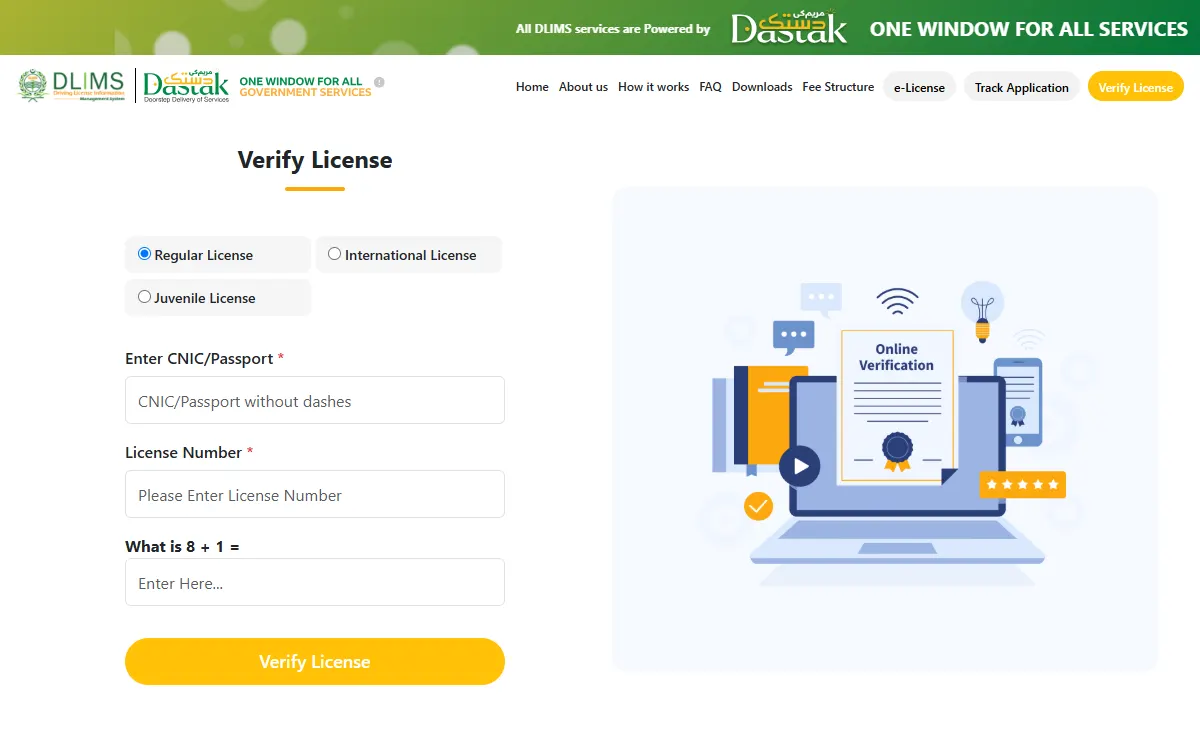
Three official tools, and what each one asks for
| Tool on DLIMS | What you enter | What it is for |
|---|---|---|
| Verify License | License type, CNIC (or passport), license number, captcha | Confirming that a license is genuine and current |
| Track Application | CNIC (or passport), captcha | Seeing where your application or card has reached |
| e-License | License type, CNIC (or passport), date of birth, captcha | Generating your digital license to save or print |
So if you have only your CNIC in hand, Track Application and e-License are the two that work. Verify License is the one that also needs the license number printed on the card.
What to keep in hand before you check
None of the three tools needs an account, a card reader or a payment, so the check takes about a minute if you have these ready:
- Your CNIC number, as 13 digits with no dashes.
- Your license number, copied from the card, if you are using Verify License.
- Your date of birth exactly as it appears on your record, if you are using e-License.
- A phone or computer with a working connection, because the maths captcha refreshes if the page is left open too long.
Write nothing on a website that asks for a fee, an OTP or your bank details for any of this. The official portal asks for none of them.
Which one do you need?
- “My card has not arrived yet.” Use Track Application. It asks for your CNIC and a captcha, and shows the tracking result for your application.
- “I need proof of my license today.” Use e-License with your CNIC and date of birth. It generates the digital copy.
- “I am hiring a driver and want to check his license.” Use Verify License. You will need the license number from his card as well as his CNIC, which is deliberate: a CNIC alone should not let a stranger pull someone’s license record.
- “My license is for a child or for travel abroad.” Pick the Juvenile or International option before typing anything. Those licenses are stored separately, and an unfound record often just means the wrong option was selected.
If nothing is found
Check these in order before you worry:
- CNIC format. 13 digits, no dashes and no spaces.
- License type. Regular, International and Juvenile are separate choices on every DLIMS form.
- License number. Copy it exactly from the card, including any letters.
- Date of birth. On the e-License form it must match your record, and the box takes the date from the calendar picker.
- Very old licenses. A manual license issued long ago may never have been entered into DLIMS. In that case the licensing centre has to be visited in person.
DLIMS is part of the Punjab government’s Dastak one-window service, so applications, payments and card tracking now run through the same system. Our driving license guide for Punjab covers applying, the tests, the fee and renewal from the start.
If your license is lost, expired or damaged
A check by CNIC answers the first question in each of these cases: does the record exist, and what does it say. What you do next depends on the answer.
- Lost card, record found. Generate the e-license from your CNIC and date of birth so you have something to show while you arrange a duplicate.
- Expired license. The record still exists, but driving on it is an offence. Renewal and duplicate applications for Punjab now go through the Dastak one-window service, and our driving license guide sets out the steps, the documents and the fee.
- Record not found at all. Do not apply again blindly. Confirm the license type first, then call the DLIMS number below, because a second application can create a second record and slow everything down.
Keep a saved copy of your e-license on your phone. It costs nothing, and it is far easier to produce at a check post than a card left at home.
Keep the rest of your driving record clean
Two checks are worth doing on the same day:
- Traffic challans. Camera challans stay against your vehicle even if the slip never reached you. See our e challan check guide.
- Vehicle record. Check the registration record with our MTMIS vehicle verification guide, and any tax due with our token tax guide.
Driving with an expired license risks a fine at the next check post, and an expired license also slows down other paperwork, such as adding a vehicle to your name.
Official contact for DLIMS
The portal prints its own contact details for license queries:
- Phone: 042-99202892
- Email: info@dlims.punjab.gov.pk
- Emergency number: 15
For application and payment questions, the Dastak one-window helpline is 1202.
Beware of fake license agents
No agent can “get” you a license without the tests, and nobody needs to charge you for a check:
- Verification, tracking and the e-license are free on dlims.punjab.gov.pk.
- DLIMS does not ask for an OTP or a bank PIN to show a record. Anyone asking for those is trying to rob you.
- Websites and shops that promise a license “without a test” are selling a fake, and a fake license means a fine and a case, not a shortcut.
- Pay license fees only through the official channels shown in the Dastak or DLIMS fee structure.
If someone demands money for a license or for checking one, report it through the Pakistan Citizen’s Portal.
GoPunjab is an independent website. We cannot verify, issue or renew any license, and we never see your CNIC. Finish every check on the official DLIMS portal.